Intro:
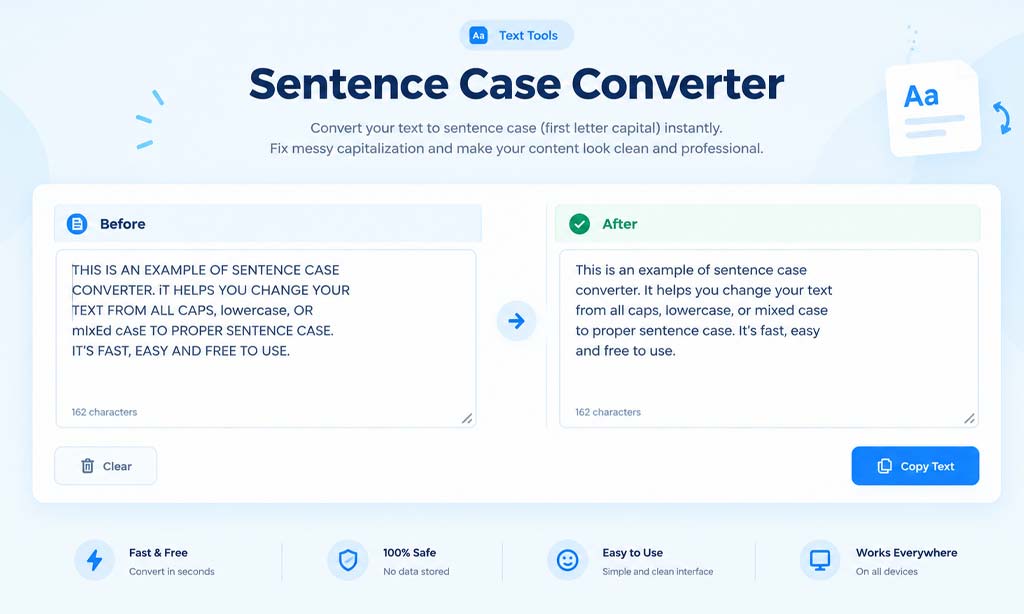
Copy-pasted text from PDFs, old documents, or someone else’s ALL CAPS email often comes out messy — wrong capitalization, random uppercase words, broken formatting. Fixing it manually wastes time. That’s exactly what a sentence case converter solves: paste your text, and it instantly capitalizes it the correct way — first letter of each sentence capitalized, rest in lowercase. Try the free Sentence Case Converter below.
What Is Sentence Case?
Sentence case means only the first word of a sentence (and proper nouns) are capitalized — the standard style used in books, articles, and formal writing. It’s different from:
- UPPERCASE — every letter capitalized
- lowercase — no capitals at all
- Title Case — Every Major Word Capitalized
Why Sentence Case Matters for Readability
All-caps text is harder to read and often comes across as shouting online. Proper sentence case makes content look professional, whether it’s an email, a blog post, or a product description.
How to Convert Sentence Case Online (Step-by-Step)
- Open the tool: Go to the Sentence Case Converter
- Paste your text: Drop in any messy or incorrectly capitalized text
- Click Convert: The tool instantly reformats it to correct sentence case
- Copy the result: Paste it directly into your document, email, or CMS
Need a Different Case Style? Lower Case and Title Case Converters
Sometimes you don’t need sentence case at all — you need the opposite.
Converting Text to Lower Case
If your text needs to go to lower case entirely — no capitals anywhere — our lower case converter handles that the same simple way: paste, convert, copy. This is especially useful for cleaning up usernames, file names, or email addresses that got auto-capitalized.
Converting Text to Title Case
For headlines, blog titles, or book names, a title case converter capitalizes every major word automatically, following standard title formatting rules.
Common Situations Where You Need These Tools
Fixing Pasted PDF or Scanned Text
Text copied from PDFs often loses formatting and comes out in random case.
Cleaning Up Someone Else’s ALL CAPS Message
Converts shouty uppercase emails or messages into normal readable text using lowercase conversion.
Preparing Content for Publishing
Ensures blog posts, product listings, or articles follow consistent formatting before going live.
Frequently Asked Questions
Q: Does sentence case capitalize every sentence in a paragraph?
A: Yes — the first letter after every full stop gets capitalized automatically, not just the first word of the text.
Q: What’s the difference between sentence case and lower case online tools?
A: A lower case converter removes all capitals entirely, while sentence case keeps standard capitalization at the start of each sentence.
Q: Will it fix proper nouns correctly?
A: Basic converters capitalize only sentence starts; always do a quick manual check for names and brand terms afterward.
Final Thoughts
A sentence case converter is one of those small tools that saves real time once you start using it — no more manually retyping messy, all-caps, or inconsistently formatted text. Whether you need to convert sentence case, switch everything to lower case, or format a headline in title case, HmSEOtools has a free tool for each. Try it now and paste your next block of text to see the difference instantly.