Intro
Whether you’re writing a blog post, formatting an email, or coding a webpage, knowing how to create a hyperlink properly is a basic but essential skill. A broken or incorrectly formatted link doesn’t just look unprofessional — it can hurt user experience and even your SEO. In this guide, you’ll learn exactly how HTML hyperlinks work and how to generate clean, correct link code instantly using our free Href Link Generator.
Create Link Code in One Click
If you just need to create link code fast — without learning HTML syntax — our generator does the heavy lifting. Paste your URL, add your anchor text, and get valid clickable code in seconds.
What Is a Hyperlink and Why Does It Matter?
A hyperlink is a piece of HTML code (<a href="...">) that turns plain text or an image into a clickable element, taking the user to another page or website. Search engines also use hyperlinks to crawl and understand the relationship between pages — which is why getting the HTML structure right matters just as much for SEO as it does for usability.
The Basic Anatomy of an HTML Hyperlink
Every hyperlink follows the same core structure:
<a href="https://example.com" title="Example Site">Click Here</a>href— the destination URLtitle— optional tooltip text (also read by screen readers)- Anchor text — the clickable words the user actually sees
How to Create a Hyperlink Manually (And Why It’s Risky)
You can write this HTML by hand, but it’s easy to make small mistakes — a missing quotation mark, an unclosed tag, or a typo in the URL — that break the link entirely or mess up your page’s formatting. This is exactly where a dedicated hyperlink tool saves time and avoids errors.

How to Create a Hyperlink Online Using HmSEOtools
Using a hyperlink creator removes all the guesswork. Here’s the exact process:
Step-by-Step Instructions
- Open the tool: Go to the Href Link Generator
- Enter your URL: Paste the full destination link (including
https://) - Add your anchor text: Type the clickable words you want visitors to see
- (Optional) Add a title attribute: Helps with accessibility and SEO context
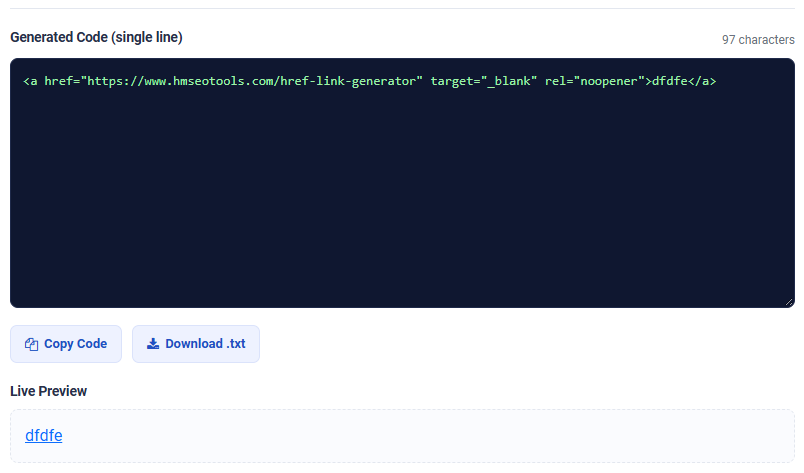
- Generate the code: The tool instantly builds clean, valid HTML
- Copy and paste: Drop the generated code straight into your CMS, email, or HTML file

Common Hyperlink Mistakes to Avoid
Forgetting the “https://” Prefix
Without it, browsers may treat the link as a relative path and it won’t work correctly.
Using Vague Anchor Text
Words like “click here” tell users and search engines nothing about the destination page. Descriptive anchor text performs better for both usability and SEO.
Not Opening External Links in a New Tab
For links pointing away from your own site, adding target="_blank" rel="noopener" keeps visitors from losing your page entirely.
Broken or Mistyped URLs
A single typo in the href value sends users to a 404 page. Always test your generated link before publishing.
Why Use a Dedicated HTML Link Generator?
Manually typing hyperlink code works fine occasionally, but for anyone publishing content regularly — bloggers, marketers, developers — a reliable html link generator saves time and eliminates formatting errors. We’ve also covered how proper internal linking improves overall SEO structure in our earlier post: Hyperlink Generator: Simplify Your SEO Efforts with Ease.
Frequently Asked Questions
Q: How do I create a hyperlink without coding knowledge?
A: Use a free href generator — just paste your URL and anchor text, and the tool writes the HTML for you automatically.
Q: Can I create a hyperlink for an email signature?
A: Yes, the generated <a href="..."> code works in most email clients that support HTML formatting.
Q: What’s the difference between a hyperlink and a URL?
A: A URL is just the web address itself; a hyperlink is the clickable HTML element that uses that URL as its destination.
Final Thoughts
Learning how to create a hyperlink correctly takes two minutes with the right tool — no coding experience required. Whether you’re linking within a blog post, formatting an email, or building internal links for SEO, use the free <a href=”https://www.hmseotools.com/href-link-generator” title=”Href Link Generator”>Href Link Generator</a> to generate clean, error-free HTML every time.